Example app
We’ll be building a simple twitter-like site. The source code for the example
can be found in the examples/twitter directory. You can also browse the
source-code
on github.
Tip
There is also an example blog app, however it is not covered in this guide.
The example app uses the flask web framework. You will need to install it to run the example:
pip install flask
Running the Example

cd into the twitter example directory and execute the run_example.py
script:
python run_example.py
The example app will be accessible at http://localhost:5000/
Code Structure
For simplicity all example code is contained within a single module,
examples/twitter/app.py. For a guide on structuring larger Flask apps with
peewee, check out Structuring Flask Apps.
Models
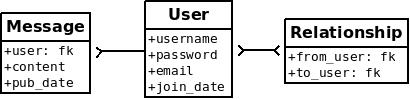
peewee uses declarative model definitions. Declare a model class for each table. The model class then defines one or more field attributes which correspond to the table’s columns. For the twitter clone, there are three models:
- User:
Represents a user account and stores the username and password, an email address for generating avatars using gravatar and a datetime field indicating when that account was created.
- Relationship:
This is a utility model that contains two foreign-keys to the User model and stores which users follow one another.
- Message:
Analogous to a tweet. The Message model stores the text content of the tweet, when it was created, and who posted it (foreign key to User).
If you like UML, these are the tables and relationships:
To create these models we need:
declare a
SqliteDatabaseobjectdeclare our model classes
declare columns as
Fieldinstances on the model classes
# create a peewee database instance.
database = SqliteDatabase(DATABASE)

# models specify their fields (or columns) declaratively, like django.
class User(database.Model):
    username = CharField(unique=True)
    password = CharField()
    email = CharField()
    join_date = DateTimeField()

# this model contains two foreign keys to user. it allows us to model a
# "many-to-many" relationship between users. by querying and joining on
# different columns we can expose who a user is "related to" and who is
# "related to" a given user.
class Relationship(database.Model):
    from_user = ForeignKeyField(User, backref='relationships')
    to_user = ForeignKeyField(User, backref='related_to')

    class Meta:
        indexes = (
            # Specify a unique multi-column index on from/to-user.
            (('from_user', 'to_user'), True),
        )

# simple one-to-many relationship: one user has 0..n messages.
class Message(database.Model):
    user = ForeignKeyField(User, backref='messages')
    content = TextField()
    pub_date = DateTimeField()
Peewee supports many different field types which map to different column types commonly supported by database engines. Conversion between python types and those used in the database is handled transparently, allowing you to use the following in your application:
Strings (unicode or otherwise)
Integers, floats, and
Decimalnumbers.Boolean values
Dates, times and datetimes
None(NULL)Binary data
Creating Tables
To start using the models you must first create the tables. This is a one-time operation and can be done quickly using the interactive interpreter. We can create a small helper function to accomplish this:
def create_tables():
    with database:
        database.create_tables([User, Relationship, Message])
Open a python shell in the directory alongside the example app and execute the following:
>>> from app import *
>>> create_tables()
Every model has a create_table() classmethod which runs a SQL
CREATE TABLE statement in the database. This method will create the table,
including:
columns
foreign-key constraints
indexes
sequences
check constraints
Peewee provides a helper method Database.create_tables() which will
resolve inter-model dependencies and call create_table() on
each model, ensuring the tables are created in order.
Note
Adding, removing or modifying fields after the table has been created will require you to either:
drop the table and re-create it, OR
manually add, drop or modify the columns, OR
use the migration runner to script your changes.
The example app ships a .pwmigrate config and an initial migration, so
the schema can also be built and evolved with pwmigrate up.
Database Connection
The models above subclass database.Model, a Model base-class
bound to our database. A model may also declare its database, and much else,
with an inner Meta class. See Meta options.
This is a peewee idiom:
DATABASE = 'tweepee.db'

# create a database instance that will manage the connection and
# execute queries
database = SqliteDatabase(DATABASE)

# subclass database.Model to bind models to the database.
class User(database.Model): ...
Alternately, you can use a base class to express the same thing:
class BaseModel(Model):
    class Meta:
        database = database  # Assign the peewee database instance.

class User(BaseModel):
    ...
When developing a web application, it’s common to:
Open a connection when a request starts.
Run your request-handler.
Close the connection before returning the response.
You should always manage your connections explicitly. For instance, if you
are using a connection pool, connections will only be recycled
correctly if you call connect() and close().
Flask provides connection setup/teardown hooks via decorators:
@app.before_request
def before_request():
    database.connect()

@app.teardown_request
def teardown_request(exc):
    if not database.is_closed():
        database.close()
See also
Framework Integration covers setting-up hooks for a variety of popular web frameworks.
Note
Peewee uses thread local storage to manage connection state, so this pattern can be used with multi-threaded or gevent WSGI servers.
Peewee’s asyncio integration stores connection state in task-local storage, so the same pattern applies.
Making Queries
In the User model there are a few instance methods that encapsulate some user-specific functionality:
following(): who is this user following?followers(): who is following this user?
These methods are similar in their implementation but with an important difference in the SQL JOIN and WHERE clauses:
def following(self):
    return (User
            .select()
            .join(Relationship, on=Relationship.to_user)
            .where(Relationship.from_user == self)
            .order_by(User.username))

def followers(self):
    return (User
            .select()
            .join(Relationship, on=Relationship.from_user)
            .where(Relationship.to_user == self)
            .order_by(User.username))
Storing Data
When a new user wants to join the site we need to make sure the username is
available, and if so, create a new User record. Looking at the join()
view, we can see that our application attempts to create the User using
Model.create(). The User.username field has a unique constraint, so if
the username is taken the database will raise an IntegrityError.
try:
    with database.atomic():
        user = User.create(
            username=request.form['username'],
            password=md5(request.form['password'].encode('utf-8')).hexdigest(),
            email=request.form['email'],
            join_date=datetime.datetime.now())

    # mark the user as being authenticated by setting the session var.
    auth_user(user)
    return redirect(url_for('homepage'))

except IntegrityError:
    flash('That username is already taken')
We will use a similar approach when a user wishes to follow someone. To
indicate a following relationship, we create a row in the Relationship
table pointing from one user to another. Due to the unique index on
(from_user, to_user), we will be sure not to end up with duplicate rows:
user = get_object_or_404(User, username=username)
try:
    with database.atomic():
        Relationship.create(
            from_user=get_current_user(),
            to_user=user)
except IntegrityError:
    pass
Subqueries
If you are logged-in and visit the twitter homepage, you will see tweets from the users that you follow. We can implement this cleanly with a subquery:
Note
user.following() will automatically only select User.id when it is
used in a subquery.
# python code
user = get_current_user()
messages = (Message
            .select()
            .where(Message.user.in_(user.following()))
            .order_by(Message.pub_date.desc()))
This code corresponds to the following SQL query:
SELECT t1."id", t1."user_id", t1."content", t1."pub_date"
FROM "message" AS t1
WHERE t1."user_id" IN (
    SELECT t2."id"
    FROM "user" AS t2
    INNER JOIN "relationship" AS t3
        ON t2."id" = t3."to_user_id"
    WHERE t3."from_user_id" = ?
    ORDER BY t2."username"
)
ORDER BY t1."pub_date" DESC
Other Topics
A couple other things in the example app:
Support for paginating lists of results is implemented in a simple function called
object_list. This function is used by all the views that return lists of objects.def object_list(template_name, qr, var_name='object_list', **kwargs): kwargs.update( page=int(request.args.get('page', 1)), pages=max(1, (qr.count() + 19) // 20)) kwargs[var_name] = qr.paginate(kwargs['page']) return render_template(template_name, **kwargs)
Simple authentication system with a
login_requireddecorator.auth_useradds user data to the session on login.login_requiredwraps view functions, redirecting to the login page when the session isn’t authenticated.def auth_user(user): session['logged_in'] = True session['user_id'] = user.id session['username'] = user.username flash('You are logged in as %s' % (user.username)) def login_required(f): @wraps(f) def inner(*args, **kwargs): if not session.get('logged_in'): return redirect(url_for('login')) return f(*args, **kwargs) return inner
Return a 404 response instead of throwing exceptions when an object is not found in the database.
def get_object_or_404(model, *expressions):
    try:
        return model.get(*expressions)
    except model.DoesNotExist:
        abort(404)
Tip
To avoid having to frequently copy/paste object_list()
or get_object_or_404(), these functions are
included as part of the playhouse flask extension module.
from playhouse.flask_utils import get_object_or_404, object_list
More Examples
There are more examples included in the peewee examples directory, including:
Example blog app using Flask and peewee. Also see accompanying blog post.
An encrypted command-line diary. There is a companion blog post you might enjoy as well.
Analytics web-service (like a lite version of Google Analytics). Also check out the companion blog post.
See also
Like these snippets and interested in more? Check out flask-peewee - a flask plugin that provides a django-like Admin interface, RESTful API, Authentication and more for your peewee models.